
Version history for agent rules files
See what changed in your agent's rules files before the next session loads them.
Echo Vault keeps numbered versions of AGENTS.md, CLAUDE.md, SOUL.md and Cursor rules, shows exactly what changed, and flags edits that add a tool, shell access or a new web address, or remove an approval rule. Uploading, checkpoints and comparisons are free.
One report $9 once · Connected Vault $19/month with a 7-day free trial · Cancel any time in Settings.
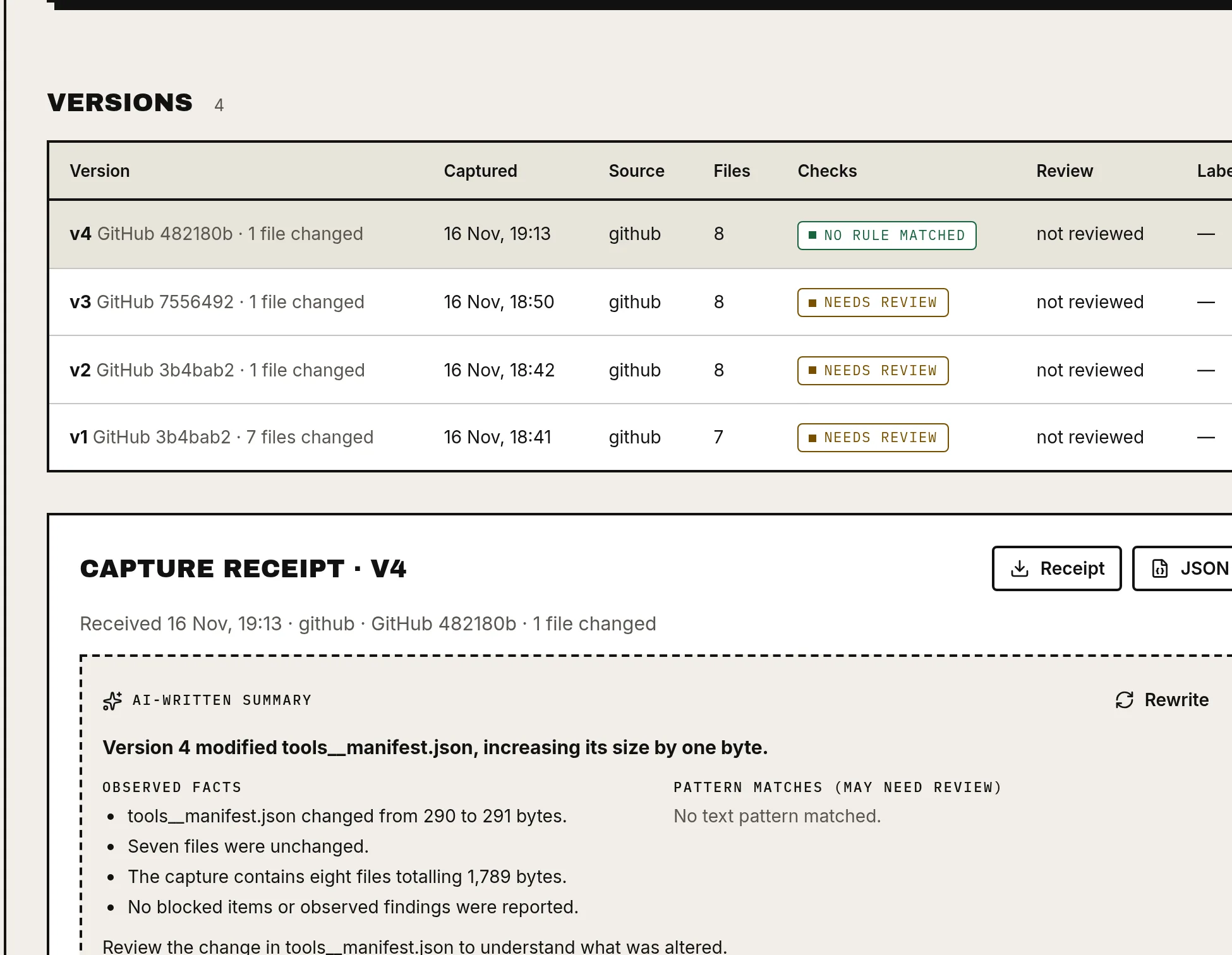
A Tuesday with Echo Vault
Monday your agent works. Tuesday a git pull, a sync job or the agent itself has edited AGENTS.md. Echo Vault shows the one new line that adds shell access, you reject it, and you pull back the version you approved. Echo Vault checks that the restored files match it byte for byte.
Matching files don't prove the agent will behave the same. Models, tools and settings outside these files can still change.
One record from capture to restore.
You revise an instruction, replace a config file, or move an agent somewhere new. Before you carry on, you want one answer: what changed from the version I meant to keep?
What was captured
Every version gets a receipt.
Fingerprint
256 bit
SHA-256 per file. Nothing guessed.
What you load
Production needs an approval.
Per file
2 MB
Text files only.
What changed
Risky edits get flagged.
Restore check
Restored files, verified.
Fingerprints prove files are byte-identical. They do not prove your agent is safe or behaves the same, and warnings are not a security guarantee.
Don’t take our word for it. Inspect the difference.
Select a file. Echo Vault compares exact contents by SHA-256 hash, so nothing is guessed or interpreted.
AGENTS.md · SHA-256
- Baseline
- 7a3f91c20000… · v3 · 4210 B
- Updated
- e2d4570b0000… · v4 · 4388 B
The content hash differs from the baseline. Open both versions and confirm the change was intentional.
From loose files to a reviewable checkpoint.
- 1
Upload your files
Add the instruction and identity files you want to keep. Never upload keys, passwords or tokens; credential-like files are blocked.
- 2
Create a checkpoint
Give the file set a label before you change anything. Checkpoints cannot be edited afterwards.
- 3
Compare and review
See which files were added, modified, removed or left unchanged, then approve or reject each change.
- 4
Report and restore
Buy a continuity report when you need one. Restore bundles and your own files are always free to download.
Connected Vault
Capture automatically. Load deliberately.
A small program on your computer watches the folder you choose. Every change becomes a new numbered version with its own receipt. Nothing is loaded back until you approve it and label it.
- Watches only the folder you select; credential-like files are never sent
- Batches edits and retries interrupted syncs
- Shows when each connector last synced
- Pull loads the version labelled production or staging, shows a dry run, never deletes, and verifies what it wrote
- 1Edit a local file
- 2Captured as a new version with a receipt
- 3Review warnings and differences
- 4Approve and label staging or production
- 5Pull and verify that exact version
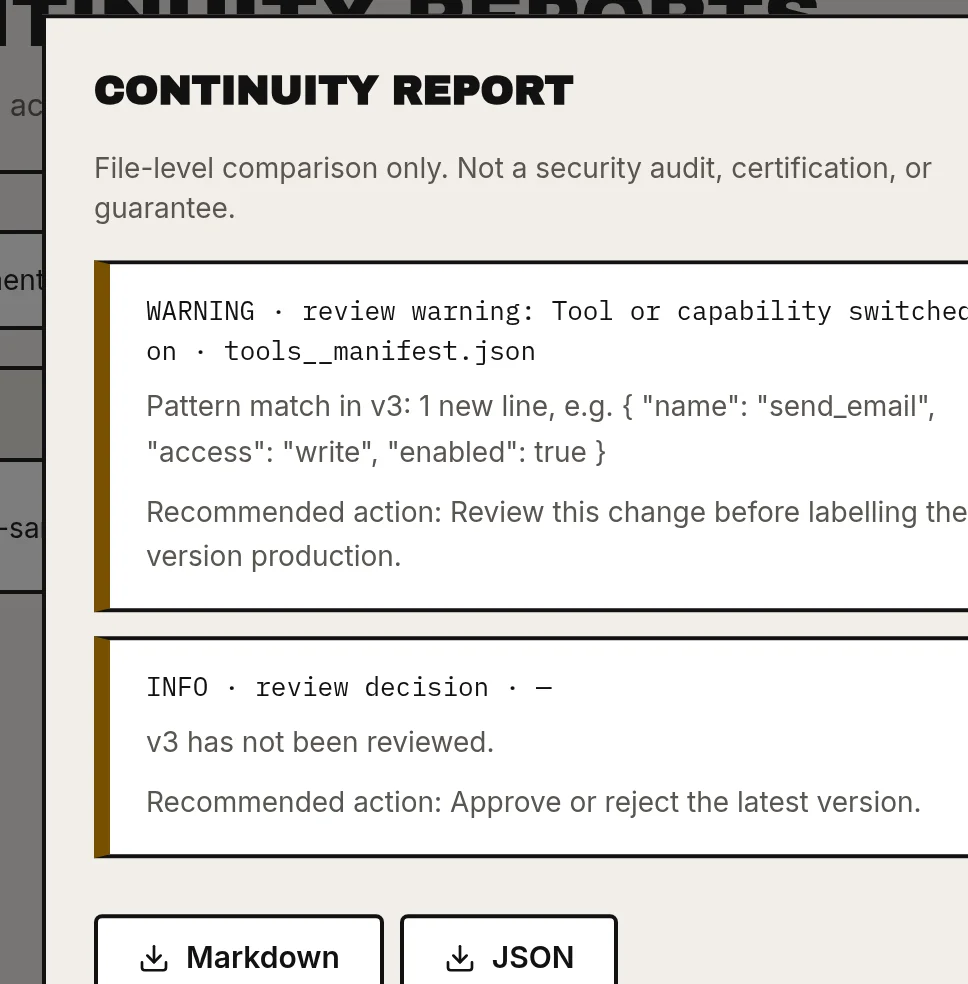
What does a continuity report show?
A documented comparison of the file sets you select, not an unexplained score.
- The agent and the baseline checkpoint you chose
- Every added, modified and removed file
- Version mismatches between baseline and active files
- Any stored file that fails its SHA-256 check
- Change reviews still waiting for a decision
- A recommended action for each finding, and the limits of the check
Download as Markdown or JSON, as many times as you like.
Free · Open source
Prefer to keep it all on your machine? Use ECHO.md.
Our free command-line tool saves versions of your agent files on your own disk and keeps a short summary your agent can read. Python or TypeScript, no account, Apache-2.0.
Get ECHO.md freeAlready using Git? Keep using it.
If your repository and review process already give you what you need, Echo Vault may not add much. It is for people who want a focused checkpoint-to-report workflow for agent files, with restore bundles alongside.
| Git alone vs Echo Vault | Git alone | Echo Vault |
|---|---|---|
| Version history | Yes | Yes |
| Flags new tools, shell access, new web addresses and removed approval rules | You'd build your own checks | Yes |
| Approval with staging and production labels | Your own PR process | Yes |
| Check that restored files match the approved version | Not built in | Yes |
| Shareable continuity report | Not built in | Yes, $9 |
| Works on a folder that isn't a repo | No | Yes, folder watcher |
If Git already covers you, keep using it.
What we store, and what we never touch
What we store
Your email, an optional display name and a hashed password; the agent files you upload, their SHA-256 fingerprints, checkpoints, reviews, reports and restore bundles; and purchase records. Files sit in private storage only your account can reach. Privacy
Credentials are blocked
Uploads that look like API keys, passwords, tokens or private keys are rejected automatically.
Your agent is never touched
Echo Vault never runs, connects to or logs in to your agent, and never asks for its credentials.
One change to check? Or an agent to keep track of?
Free
$0 no card
- Upload agent files
- Create checkpoints
- Compare versions
- Review changes
- Download restore bundles
One report
$9 once
A documented comparison against the baseline you choose: added, modified and removed files, version mismatches, SHA-256 failures and pending reviews.
- Markdown or JSON, download as often as you like
- No subscription
Connected Vault
$19 /month
- Up to 3 agents
- Automatic capture from a folder (Node.js 18+) or GitHub
- Version history and diffs
- 5 reports a month
- Pull a version you approved
7-day free trial for first-time subscribers. Cancel any time in Settings; your files stay.
Checking one or two changes a month? Single reports cost $9 or $18. Three or more? Connected Vault is $19 and includes 5 reports.
Run the comparison free first. Pay $9 only if you want the written report. If you're charged and no report appears, or you're charged twice, we fix it or refund you.
Clear about what we check, and what we don’t.
Echo Vault helps you
- Keep permanent, numbered versions of selected agent files
- Issue a capture receipt with exact fingerprints
- Flag risky changes for review with clear rules
- Record approvals, staging and production labels
- Check that restored files match the chosen version
It does not establish
- Full runtime recovery of your agent
- Identical future behaviour
- A security or compliance certification, or protection from memory poisoning
- Migration of memory stores, tools or other dependencies
Your files are private to your account and stored privately. Each record can only be read by its owner.
Questions
What counts as an agent identity file?
Does this work with SOUL.md and AGENTS.md?
What exactly does a continuity report check?
Does a report prove my agent will behave the same?
Does Echo Vault run my agent?
Can I export my files without buying a report?
How does automatic capture work?
Can I track files from GitHub?
What happens when I cancel the plan?
How is this different from using Git?
What should I avoid uploading?
How long are files kept, and how do I delete them?
What happens if report generation fails?
Before the next change, create a checkpoint.
Give yourself a baseline to compare against, and a file set you can carry forward.